Seven questions, one blueprint: what YARDtwin would look like on your site
Most yard-software conversations start with a demo of someone else's yard. You watch trucks you don't recognise arrive at docks that aren't yours, and the real questions (which features your site needs, what has to connect to what, what it will cost) wait for a discovery phase that takes weeks.
The solution configurator turns that round. It asks seven short questions about your site and builds the blueprint while you answer: the capability packs and settings that fit, how the integration works, how a rollout would run, how you would prove it works, and what it costs. It is free, it needs no account, and nothing is stored unless you ask for the documents by e-mail.
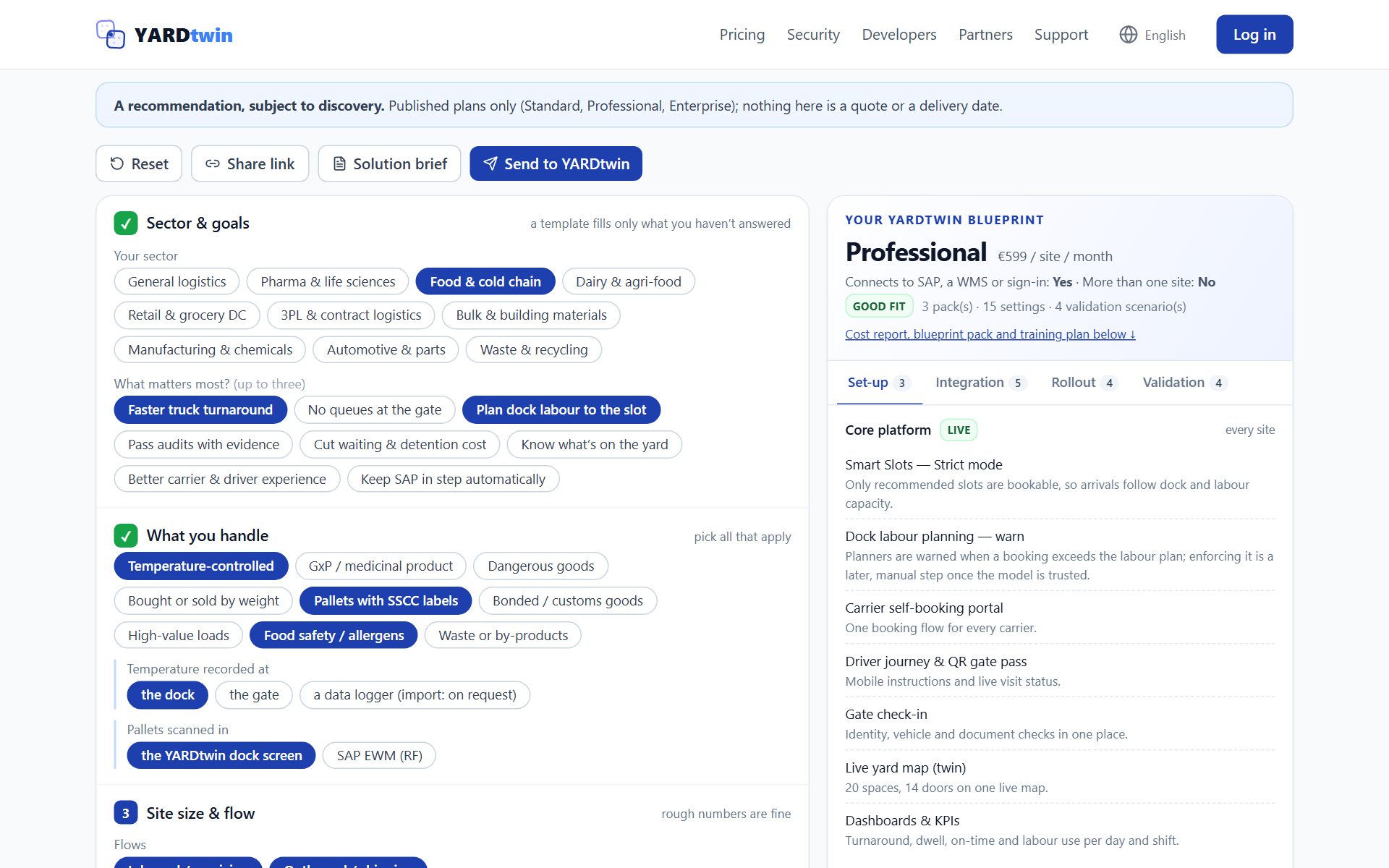
Seven questions
Pick the sector closest to yours and the answers fill with a sensible starting point. There are ten, from pharma and food to bulk materials, automotive and waste. Then change whatever is different about your site.
- Sector & goals. Your sector, and up to three things that matter most: faster turnaround, no queues at the gate, dock labour planned to the slot, audits passed with evidence, less waiting and detention cost.
- What you handle. Temperature-controlled goods, medicinal products, dangerous goods, goods bought or sold by weight, SSCC-labelled pallets, bonded goods, high-value loads.
- Site size & flow. Inbound and outbound, dock doors, trucks a day and in the busiest hour, yard spaces, gates, shifts, dropped trailers, and whether one truck carries several deliveries.
- People on site. How many carriers, who books the slot, the languages your drivers speak, safety induction, visitor sign-in and evacuation roll-call.
- Compliance & control. GMP, GDP, BRCGS / IFS, ADR, customs, legal-for-trade weighing, UK digital waste tracking and seal checks at dispatch.
- Systems you'll connect. SAP S/4HANA with or without EWM, SAP ECC, another WMS or ERP, or nothing at all; and a TMS, ANPR cameras, a weighbridge indicator, Microsoft or Google sign-in, Teams or Slack alerts.
- Ownership & rollout. Who leads appointments and yard execution, how many sites, a pilot or site waves, and when you want to go live.
What the blueprint shows
The blueprint sits beside the questions and changes with every answer. It has four tabs.
- Set-up. The capability packs your answers call for, each with the answers that triggered it, and the settings they switch on.
- Integration. The messages between YARDtwin and your systems, which of them are in your scope, and what each side owns.
- Rollout. The questions to settle in discovery, the measures to baseline before go-live, and the settings that are set up by hand.
- Validation. The scenarios that prove the set-up works, starting with the core run: book, gate in, dock, depart.
What it costs, and why
The plan follows from two answers. Connect SAP or another system, a TMS or Microsoft or Google sign-in, and the blueprint needs Professional, the plan that carries the connectors, the public API and single sign-on. Run more than one site under one account and it needs Enterprise. Otherwise Standard covers it.
The cost comes from our published price list, per site per month and per year, so the page always shows the current figures. Standard has a fair-use line of 1,000 truck movements a month: a line for a conversation, not a meter, and nothing is throttled or billed per movement. Enterprise is priced per site under an annual contract and quoted per account, so instead of a figure you get a button to request a quote.
Take it with you
- The blueprint pack (PDF). Cost, set-up, implementation plan, readiness checklist, roles, validation protocol, carrier notice, a brief for your SAP partner when SAP is in scope, and a measurement plan built from your sector's measures.
- The training plan (PDF). Every role on the site, with its modules, exercises and the help-centre pages written for that role.
- Both by e-mail. If you would rather have them in your inbox, or want to pass them on.
- A share link and a one-page brief. The link carries your answers, so a colleague opens exactly what you saw.
For SAP partners
Open the SAP partner view and the same configurator starts on the Integration tab: the SAP sync points, the messages SAP sends to YARDtwin and the ones YARDtwin sends back, and which side leads appointments and yard execution. The brief becomes an SAP + YARDtwin solution brief that the partner and the customer can work from together.
Inside YARDtwin: Site configurator
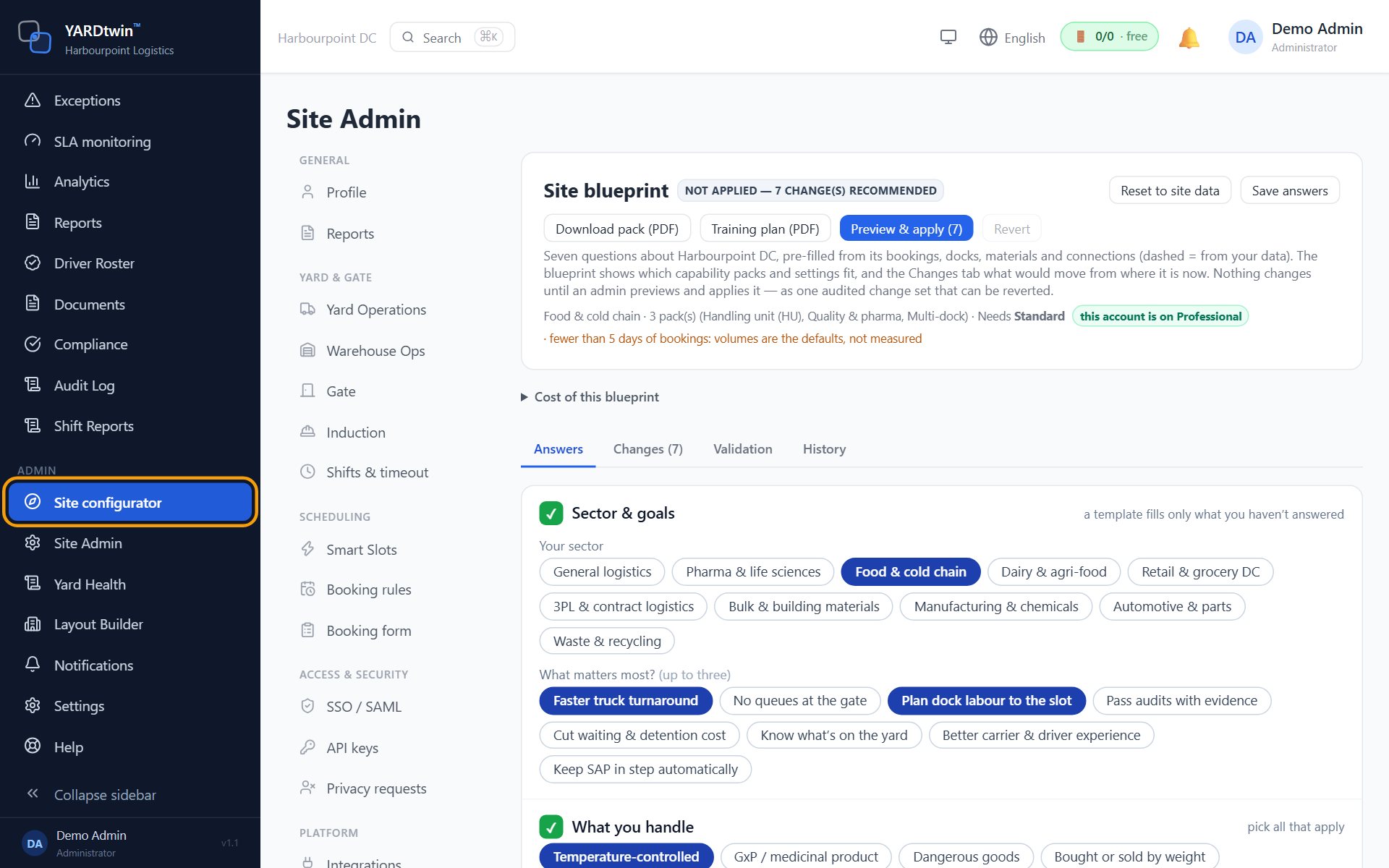
Customers get the same configurator inside the product as Site configurator, the first item of the Admin menu. The difference is that it starts from your site rather than a blank page.
- Pre-filled from your site. The answers come from the site's own settings, so the blueprint compares what you run today with what it recommends.
- Changes, then apply. A table shows each setting now and in the blueprint. Preview & apply switches them on as one audited change set that can be reverted, and anything changed outside the blueprint afterwards is flagged.
- Validation, signed. The scenarios of the applied blueprint run as a checklist, and each one is signed with an electronic signature.
- Cost against your plan. The cost card sets what the blueprint needs beside the plan the account is on, and the full chapter is in the blueprint pack.
- Room for your partner. An implementation partner can open the blueprint and validate it, but cannot apply settings.
Where to find it
Inside YARDtwin there are three ways in. Administrators can preview and apply a blueprint; quality and implementation-partner accounts can open it to review and validate, but not apply it.
- Admin → Site configurator. In the left-hand menu, scroll down to the Admin group: it is the first item. It opens the blueprint of the site you are working in.
- Site Admin → Site blueprint. The same page, as a tab among the other site settings.
- Ctrl + K. Open the command palette and type the first letters of its name (⌘ K on a Mac).
For the longer tour of what you can shape without a developer, see Customise YARDtwin for your business; for getting a site live quickly, see Set up your yard in a day.
Answer the seven questions for your own site: free, no account, and the blueprint pack is yours to keep. Or start a free 30-day trial and open Site configurator on your own data.