The Billing tab shows your plan and what you use, and is where you choose or change a plan. Prices are per site.
| Plan | Price | For |
|---|---|---|
| Standard | €299 per site per month | The whole yard platform for one site. |
| Professional | €599 per site per month | Standard plus SAP, WMS and ERP integrations, the public API, single sign-on and a sandbox. |
| Enterprise | Annual contract — contact us | Several sites under one account, with contracted terms. |
New accounts start with a 30-day free trial of the full product, for one site.
Steps
Open Site Admin and click Billing.
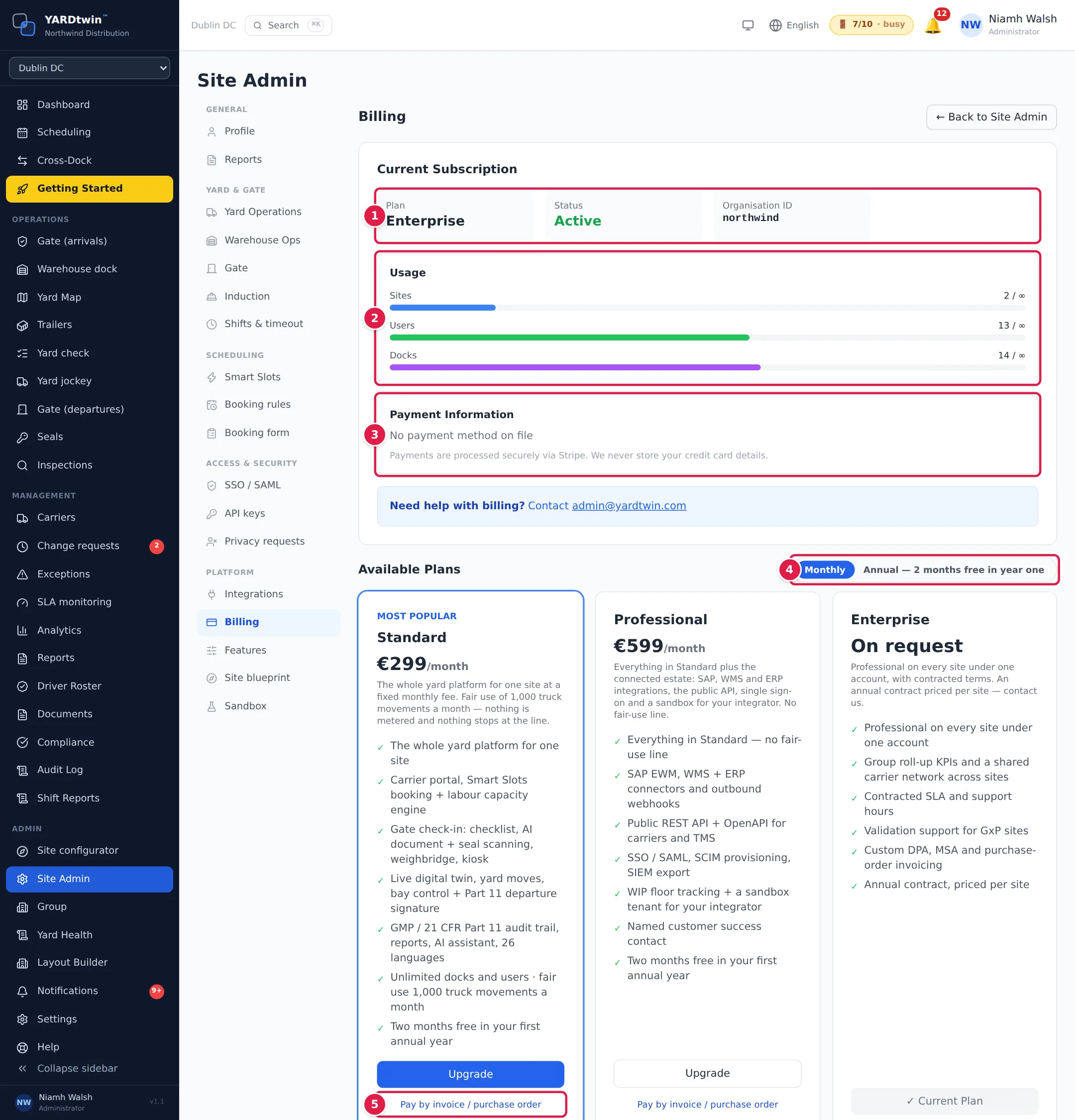
- Current Subscription. Your Plan, its Status, the Trial Days Left during a trial, and your Organisation ID.
- Usage. How many sites, users and docks you have, against your plan's limit (∞ means no limit).
- Payment Information. Once you pay by card, Manage Billing Portal → opens the secure Stripe page where you see invoices, change your card or cancel. Until then it says No payment method on file. YARDtwin never stores card details.
- Monthly or Annual — 2 months free in year one. Annual billing charges ten months for the first year; after that it renews at twelve times the monthly price.
- Pay by invoice / purchase order. Ask for an invoice instead of paying by card.
To pay by card, click Upgrade on the plan you want. You go to Stripe's secure checkout, and come back to this tab when you're done. The plan changes as soon as the payment is confirmed, which can take a few seconds.
For Enterprise, click Contact us, or e-mail admin@yardtwin.com.
Pay by invoice or purchase order
- Click Pay by invoice / purchase order under the plan.
- Choose the Billing interval, and enter your Company (legal name) and Accounts / billing e-mail. VAT number, Purchase order number and Notes are optional.
- Click Request invoice.
YARDtwin raises the invoice and sends it to the billing e-mail. Nothing is charged until it is paid.
What you'll see
The plan you are on shows ✓ Current Plan. If your company has an Enterprise contract, the tab shows the contract's annual amount, start and renewal dates instead of the plan cards.
During the last week of a trial, a banner at the top of every page counts down the days, with a button to add a payment method. About five days before the trial ends, an administrator also gets a reminder e-mail; its link opens this tab.
Administrators can also reach this tab from View detailed usage → on the dashboard's Usage this month card.
Only administrators see the Billing tab. Questions about your bill: admin@yardtwin.com.
Close your account and delete your data
Cancelling your subscription does not delete anything: your data stays so you can export it, or come back. To have everything deleted, write to dpo@yardtwin.com.
The deletion is done by YARDtwin staff, never automatically, and only once the account has been cancelled for at least 30 days. The 30 days count from the most recent record of the cancellation (the status change in your account's history, or the end of your subscription in Stripe; if neither is on record, the last change to your account), or from the last time anyone in your organisation signed in or used the account, whichever is later. Reactivating the account after cancelling restarts this: the deletion waits for a new cancellation. Nobody in your organisation may have signed in or used an API key in the 15 minutes before. While it runs, sign-in, sessions, API keys, file downloads and your public booking and driver links stop working. Earlier deletion is possible on your written request, with the reason recorded.
Before anything is deleted, your organisation receives its complete audit trail to keep for its own record-retention period, unless it declines it in writing or cannot be reached after reasonable attempts. An administrator or QA downloads it from Audit Log → Download full audit archive (end of contract), or YARDtwin prepares it and sends it to you: with your support-access grant, or, once your account is locked for closure, under break-glass access, which e-mails your organisation's administrators each time. YARDtwin may lock the account for closure first, so that nothing more is added to its records: from then on nobody in your organisation can sign in or use an API key, and your administrators and YARDtwin's data-protection officer are e-mailed when it happens. The archive is a CSV of every audit entry, with a receipt (PDF) giving its SHA-256 and the result of the hash-chain check. If no export is handed over, the certificate of deletion says why: your written decline, with its date and reference, or the dates on which YARDtwin tried to reach you. After the deletion YARDtwin keeps no copy of the audit trail in the service unless you ask for that in writing, under a separate agreement. It keeps its own record of the handover (the receipt, the archive's hashes and counts, who made it and when, and when you confirmed receiving it or YARDtwin recorded its delivery), and backups that contain the audit trail expire on their own schedule (below).
YARDtwin then deletes every record, uploaded file and audit-trail entry of your organisation in one step, checks that nothing is left, and issues a certificate of deletion listing what was deleted, what is kept, and the audit-trail archive you received. Kept by YARDtwin: records of data-protection requests and breaches, and its own platform audit entries. Point-in-time backups expire within 7 days; encrypted monthly archive backups are kept up to 7 years for disaster recovery only, and nightly dumps expire after 35 days. Invoices held by Stripe are not affected.
If something goes wrong
- "Billing is not configured yet" or "Billing service is currently unavailable" Card payment isn't available right now. Use Pay by invoice / purchase order, or e-mail admin@yardtwin.com.
- I paid but the plan hasn't changed. Wait a few seconds and reopen the Billing tab.
- "An invoice request from this account is already open" A request was sent in the last day. To change it, e-mail admin@yardtwin.com.